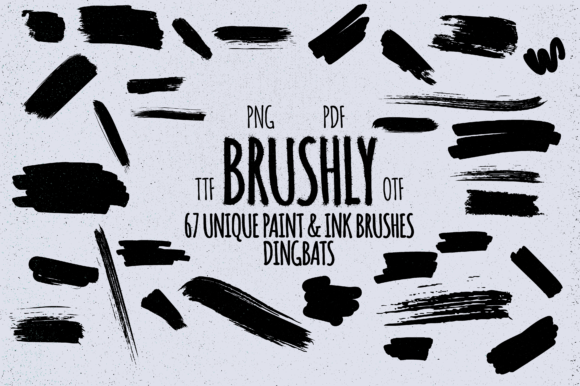
Brushly: A Practical Approach to Digital Inking with Dingbat Typography
In the evolving landscape of digital design, efficiency often competes with artistic integrity. Designers, marketers, and content creators frequently seek tools that bridge the gap between rapid production and authentic aesthetic appeal. Brushly emerges in this space not as a complex software suite, but as a specialized dingbats typeface. Its primary function is distinct: it allows users to generate realistic paint, ink, and marker strokes simply by typing letters, numbers, and punctuation. This approach shifts the workflow from manual drawing or asset hunting to typographic composition, offering a unique solution for those who need organic textures without the steep learning curve of digital painting.
Understanding the Mechanics of Brushly
At its core, Brushly operates on the principle of font-based illustration. Unlike traditional vector brushes that require pressure-sensitive tablets and steady hands, Brushly maps specific brush shapes to standard keyboard characters. When a user types a character, the corresponding glyph appears as a pre-designed brush stroke. This method leverages the familiarity of word processing to create visual art. The result is a collection of strokes that mimic the imperfections, texture, and variability of real-world media.
The significance of this mechanism lies in its accessibility. For professionals who are not illustrators by trade—such as social media managers, copywriters, or small business owners—the barrier to creating hand-drawn elements is significantly lowered. There is no need to master bezier curves or understand layer masking. Instead, the user relies on spacing, sizing, and character selection to build compositions. This makes Brushly a pragmatic tool for projects where speed and consistency are prioritized over bespoke, one-off illustrations.
Key Characteristics and Visual Quality
The visual fidelity of any brush font depends on the quality of its underlying glyphs. Brushly distinguishes itself through careful attention to the edges and internal texture of each stroke. The strokes do not appear as flat, solid colors; rather, they retain the subtle grain and uneven opacity associated with dry brushes, wet ink, or felt-tip markers. This level of detail is crucial for maintaining realism when these elements are scaled or placed against various backgrounds.
- Variety of Media: The typeface includes representations of different tools, allowing users to mix thick marker lines with finer ink details within the same text block.
- Consistent Texture: Despite being generated via keystrokes, the strokes maintain a cohesive visual language, ensuring that a sentence typed in Brushly looks like it was written in a single sitting.
- Scalability: As a vector-based font, the strokes remain crisp at any size, making them suitable for both web graphics and large-format print materials.
However, users must recognize that these are static shapes. Unlike dynamic brushes in software like Photoshop or Procreate, the strokes in Brushly do not react to pressure or tilt. The "variation" comes from selecting different characters that represent different angles or lengths of strokes. This limitation is also a strength, as it guarantees predictability. What you see on the screen is exactly what will print, eliminating the guesswork often associated with digital painting.
Practical Applications in Professional Workflows
The utility of Brushly extends across several industries where visual communication is key. For marketers and bloggers, the ability to quickly annotate screenshots or add emphasis to headings can enhance engagement. A simple underline or circle drawn with a Brushly character can draw attention to key data points more effectively than a standard geometric shape.
Educators and instructional designers also benefit from this tool. Creating worksheets, presentations, or online course materials often requires a human touch to make content feel less sterile. Using Brushly to add handwritten notes or corrections to digital documents can simulate the experience of personalized feedback, fostering a stronger connection with students or clients.
For entrepreneurs and small business owners, branding materials often require a balance between professionalism and approachability. Brushly allows for the creation of custom logos, packaging accents, or social media graphics that feel artisanal without the cost of hiring a calligrapher. By combining standard typography with Brushly’s decorative strokes, brands can achieve a unique voice that stands out in crowded digital marketplaces.
Usability and Integration
One of the strongest assets of Brushly is its compatibility. Since it functions as a standard OpenType or TrueType font, it integrates seamlessly into almost any design software that supports text input. Whether working in Adobe Illustrator, Photoshop, Canva, or even Microsoft Word, users can access the full range of brush strokes without installing plugins or learning new interfaces. This universality ensures that the tool fits into existing workflows rather than demanding a complete overhaul of processes.
Usability is further enhanced by the logical mapping of characters. Typically, uppercase letters might correspond to larger, bolder strokes, while lowercase letters offer finer details. Punctuation marks often serve as dots, splatters, or short dashes. While there is a slight learning curve involved in memorizing which key produces which shape, most users find that muscle memory develops quickly after brief experimentation. The immediate visual feedback allows for rapid iteration, enabling designers to test multiple compositions in minutes.
Limitations and Considerations
While Brushly offers significant advantages, it is not a replacement for all forms of digital illustration. Users seeking highly customized, flowing calligraphy may find the segmented nature of font-based strokes restrictive. Connecting letters smoothly requires careful kerning and overlap adjustments, which can be time-consuming compared to writing naturally with a stylus. Additionally, because the strokes are predefined, there is a risk of repetition if the same characters are used extensively in a single design. Savvy users mitigate this by rotating, flipping, or recoloring individual glyphs to create the illusion of greater variety.
Another consideration is the context of use. Brushly excels in casual, organic, or creative contexts but may lack the precision required for technical diagrams or formal corporate communications. Understanding the tone of the project is essential before deploying these assets. When used appropriately, however, the imperfections of the brush strokes add warmth and authenticity that sterile vector lines cannot replicate.
Long-Term Value for Creators
Investing in a tool like Brushly is less about acquiring a single asset and more about expanding one’s design vocabulary. For freelancers and agencies, having a reliable method to generate hand-drawn elements quickly can reduce billable hours spent on minor graphic tasks. This efficiency translates to better profit margins and faster turnaround times for clients. Moreover, the timeless nature of hand-drawn aesthetics ensures that designs created with Brushly are less likely to feel dated compared to trends driven by specific filter effects or AI-generated artifacts.
The longevity of the tool also depends on the user’s willingness to experiment. Those who take the time to explore the full character map and combine Brushly with other design elements will discover its full potential. It serves as a versatile building block, capable of adapting to various styles from rugged and grunge to clean and minimal, depending on color choices and layout.
Final Assessment
Brushly represents a thoughtful intersection of typography and illustration. It addresses a common pain point for non-illustrators who need organic visual elements but lack the time or skill to create them from scratch. By leveraging the simplicity of typing, it democratizes access to hand-drawn aesthetics. While it has limitations regarding fluidity and customization, its strengths in consistency, ease of use, and broad compatibility make it a valuable addition to many creative toolkits. For professionals seeking to add a human touch to their digital work without sacrificing efficiency, Brushly offers a practical and effective solution.