Watercolor Hand-drawn Digital Objects Bundle: A Practical Guide to Maximizing Your Creative Assets
When building a digital design library, the temptation to grab every free or low-cost resource available is strong. However, quantity rarely substitutes for quality and versatility. The Watercolor Hand-drawn Digital Objects Bundle stands out not just because of its aesthetic appeal, but because it offers a curated selection of twenty distinct collections that solve specific design problems. For creators ranging from hobbyists to small business owners, understanding how to properly integrate these assets can mean the difference between a amateurish layout and a professional-grade product.
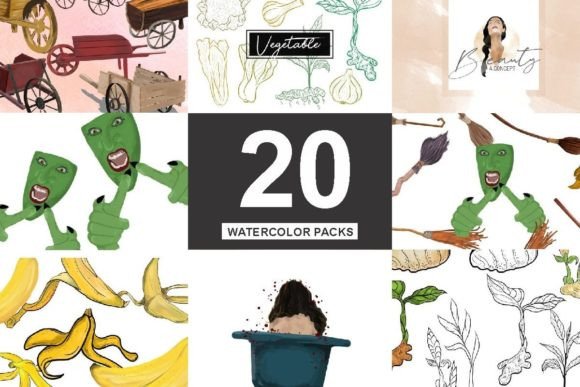
This bundle includes a diverse array of elements such as hand carts, sewing machines, florals, brushes, and even seasonal characters like Halloween figures. While the price point of six dollars with a twenty-one percent savings is attractive, the real value lies in how you use the files. Many users make critical errors in file selection and application that limit the potential of their purchases. By avoiding common pitfalls, you can ensure these watercolor illustrations enhance your projects rather than complicate them.
Misunderstanding File Formats and Resolution
One of the most frequent mistakes beginners make is ignoring the technical specifications provided in the download. This bundle contains PNGs, EPS, and JPGs. Each format serves a distinct purpose, and using the wrong one can degrade your final output significantly.
JPGs are compressed files with white backgrounds. They are suitable for quick social media posts where layering is not required. However, if you attempt to place a JPG floral element over a colored background without removing the white box, your design will look disjointed and unprofessional. PNGs, on the other hand, typically come with transparent backgrounds. These are essential for digital collages, website headers, and printable invitations where the watercolor texture needs to blend seamlessly with other elements.
The EPS files are often overlooked by non-designers, yet they are crucial for scalability. If you are creating large-format prints, such as banners or wall art, raster images like PNGs may pixelate when enlarged. EPS files are vector-based or high-resolution scalable formats that maintain crisp edges regardless of size. Ignoring these files limits your ability to scale your work for different commercial applications.
Overlooking Color Consistency and Lighting
Watercolor art is defined by its organic, fluid nature, which means lighting and color saturation can vary between individual drawings. A common error is mixing elements from different collections without adjusting for tonal harmony. For instance, placing a bright, saturated Halloween character next to a muted, pastel floral brush can create visual dissonance that distracts the viewer.
To avoid this, take time to evaluate the color palette of each object before placement. Use design software to adjust hue, saturation, and brightness so that all elements appear to exist in the same lighting environment. This step is particularly important when combining the sewing machine illustrations with the botanical elements. Ensuring a cohesive look makes the final composition feel intentional and polished rather than like a random assortment of clipart.
Neglecting Licensing and Commercial Use Rights
Many entrepreneurs assume that purchasing a digital bundle grants unlimited rights to resell the raw files. This is a dangerous misconception. Typically, licenses for bundles like this allow for use in end products—such as printed invitations, t-shirts, or digital planners—but prohibit the redistribution of the original PNG or EPS files as standalone assets.
Before launching a product line featuring these hand-drawn objects, read the license agreement carefully. If you plan to sell physical goods, ensure the license covers commercial print runs. If you are a freelancer creating work for clients, clarify whether the license transfers to the client or remains with you. Misunderstanding these terms can lead to legal issues and damage your professional reputation. Always keep a record of your purchase and license terms for future reference.
Failing to Organize Your Digital Library
With twenty collections included, this bundle contains a significant number of files. A frequent oversight is dumping all files into a single folder. This disorganization leads to wasted time searching for specific items like the hand carts or specific brush strokes when deadlines are tight.
Adopt a systematic approach to file management immediately after download. Create subfolders categorized by theme (e.g., Florals, Tools, Seasonal) and by file type (PNG, EPS, JPG). Consider renaming files with descriptive tags if the original names are generic. This small upfront investment of time pays dividends in efficiency, allowing you to locate the perfect sewing machine illustration or Halloween character instantly during the creative process.
Ignoring the Need for Customization
While the hand-drawn aesthetic is charming, using the assets exactly as they appear in the preview can make your designs look generic. Many users fail to leverage the flexibility of digital watercolors. These objects are not static; they can be flipped, rotated, cropped, and layered to create unique compositions.
For example, instead of using a full floral bouquet, isolate individual leaves or petals to create subtle borders or background textures. Combine parts of the brush illustrations with text to create custom logos. By treating these objects as building blocks rather than finished stickers, you add a layer of originality that distinguishes your work from others who may have purchased the same bundle.
What to Check Before You Buy
Before committing to any digital asset purchase, consider your specific project needs. Ask yourself:
- Do I need transparent backgrounds for layering? If yes, prioritize PNGs.
- Will I be printing at large sizes? If yes, verify the resolution of the PNGs or rely on EPS files.
- Does the style match my brand identity? Ensure the whimsical, hand-drawn nature of these watercolors aligns with your audience's expectations.
- Am I prepared to organize and edit these files? Having basic graphic design skills will maximize the value of this bundle.
The Watercolor Hand-drawn Digital Objects Bundle offers excellent value for those willing to engage with the materials thoughtfully. By paying attention to file formats, maintaining color consistency, respecting licensing terms, organizing your library, and customizing elements, you transform a simple purchase into a powerful toolkit for creative expression. Avoid the shortcut of drag-and-drop laziness, and instead invest effort into integrating these beautiful hand-drawn elements into your workflow. The result will be higher quality designs, greater efficiency, and a more professional presentation that resonates with your audience.