Mastering Product Presentation with Spray Paint Can Mockups
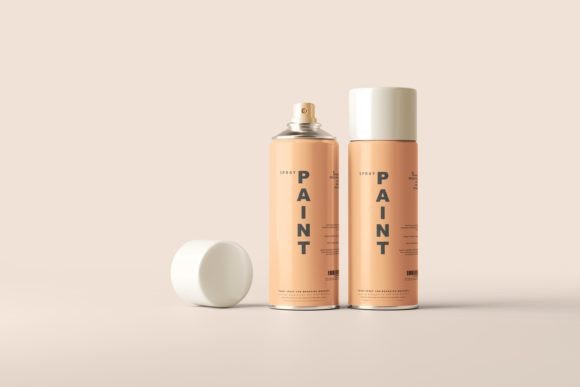
In the competitive landscape of product design and branding, the gap between a concept and a market-ready asset is often bridged by high-quality visualization. For designers working in packaging, industrial design, or street-art-inspired branding, Spray Paint Can Mockups serve as an essential tool for translating flat digital designs into tangible, realistic representations. These assets are not merely decorative; they are functional components of a professional workflow that allow creators to test aesthetics, communicate ideas to clients, and prepare marketing materials without the logistical overhead of physical prototyping.
Integrating these mockups into your design process requires an understanding of their technical capabilities and how they interact with broader project goals. Whether you are a freelancer presenting a label design to a small business owner or an in-house marketer preparing a social media campaign, the ability to rapidly iterate on visual concepts can significantly impact decision-making speed and client confidence.
The Role of Realistic Visualization in Design Workflows
Before diving into the technical specifics, it is important to understand where spray paint can mockups fit within a larger creative pipeline. Typically, a designer creates a 2D label or wrap in vector software like Adobe Illustrator. However, stakeholders often struggle to visualize how this flat artwork will appear on a cylindrical, metallic surface with specific lighting conditions and reflections. This is where the mockup becomes critical.
By using a photo-realistic representation, you bridge the cognitive gap for your audience. The high level of details found in premium mockups ensures that textures, dents, scratches, and material properties are accurately conveyed. This realism builds trust. When a client sees a design rendered in 5K resolution, they perceive a higher level of professionalism and attention to detail. It shifts the conversation from abstract critiques of color choices to concrete discussions about brand alignment and shelf presence.
Technical Features That Enhance Efficiency
Not all mockups are created equal. The utility of a mockup file depends heavily on its construction and compatibility with your existing software stack. High-quality Spray Paint Can Mockups are engineered to save time rather than consume it. Here is how specific features contribute to a smoother workflow:
- High-Resolution Output: Scenes rendered in 5K resolution provide the clarity needed for large-format printing or high-density digital displays. This ensures that when you zoom in to check edge alignment or texture mapping, the image remains crisp.
- Editable Backgrounds: Versatility is key in modern marketing. A mockup that allows you to change the background color or apply an overlay texture enables you to adapt the same asset for different contexts. You might need a clean white background for an e-commerce listing and a gritty, textured urban backdrop for an Instagram post. Having this flexibility within a single file reduces the need to source multiple images.
- Full Editability: The best mockups rely on smart objects and color overlays that respond to your design. This means all colors come from your input, ensuring that the final output matches your brand guidelines precisely. There is no guesswork involved in matching hex codes.
- Organized Layer Structure: Time is money. A well-organized file with labeled layers and sub-folders allows you to navigate the PSD quickly. Instead of hunting for the "label" layer among dozens of unnamed groups, you can jump straight to editing, maintaining your creative flow.
Compatibility and Integration with Adobe Photoshop
For most professional designers, Adobe Photoshop remains the industry standard for raster-based editing and compositing. The Spray Paint Can Mockups discussed here are optimized for this environment, specifically compatible with Photoshop CS5 and up, and created with Photoshop 2022. This broad compatibility ensures that whether you are running legacy hardware or the latest creative cloud suite, you can integrate these assets without technical friction.
When integrating these mockups into your workflow, consider the following implementation steps:
- Preparation: Ensure your 2D label design is ready and saved in a format that preserves transparency, such as PNG or PSD. Check your color mode (CMYK for print, RGB for digital) to avoid unexpected shifts when placed into the mockup.
- Placement: Open the mockup file and locate the smart object layer designated for the label. Double-click to open it, paste your design, and save. The mockup will automatically warp and adjust the design to fit the curvature of the can.
- Refinement: Use the editable layers to adjust lighting effects, shadows, and highlights. If the mockup supports dark and light color labels, toggle the appropriate settings to ensure contrast and readability are maintained.
- Export: Once satisfied, flatten the image or export it in the required resolution. The 5K capability allows you to downscale for web use while retaining a master file for future print needs.
Adapting to Light and Dark Design Contexts
One common challenge in product visualization is ensuring that the mockup works effectively regardless of the label's color palette. A design that looks striking on a white background may vanish against a dark one if the lighting and shadow interactions are not handled correctly. Premium Spray Paint Can Mockups are engineered to work great with both dark and light color label designs.
This adaptability is crucial for brands that produce multiple SKUs or variations of a product. For instance, a streetwear brand might release a limited edition spray paint can in both matte black and vibrant neon yellow. Using a single, versatile mockup file allows you to maintain consistency in presentation across both variants, reinforcing brand identity while highlighting product diversity. This consistency is vital for building a cohesive portfolio or product catalog.
Support and Long-Term Usability
Investing in design assets is not just about the initial purchase; it is about long-term reliability. Technical issues can arise, whether due to software updates or unique project requirements. Knowing that your support ticket will be answered within 24 hours provides a safety net that allows you to work with confidence. This level of support is particularly valuable for freelancers and small agencies who may not have an internal IT team to troubleshoot complex PSD files.
Furthermore, the reusability of these mockups contributes to their value. Once you have mastered the file structure, you can reuse the same mockup for multiple clients, simply swapping out the label design. This efficiency scales your output, allowing you to take on more projects without proportionally increasing your workload. Over time, this leads to a more sustainable and profitable business model.
Practical Tips for Maximum Impact
To get the most out of your Spray Paint Can Mockups, consider these practical observations:
Contextualize Your Presentation: Do not just present the can in isolation. Use the editable background feature to place the product in an environment that reflects its target audience. If the paint is aimed at graffiti artists, use an urban texture. If it is for DIY home improvement, opt for a clean, workshop-style background.
Check Lighting Consistency: Ensure that the lighting in your 2D design matches the direction and intensity of the light sources in the mockup. Mismatched lighting can break the illusion of realism. Use the overlay layers to tweak highlights and shadows if necessary.
Maintain File Hygiene: Just as the mockup itself is well-organized, keep your own working files tidy. Name your smart objects clearly and save versions iteratively. This practice makes it easier to revisit projects months later for updates or revisions.
In conclusion, Spray Paint Can Mockups are more than just pretty pictures; they are strategic tools that enhance communication, streamline production, and elevate the perceived value of your design work. By leveraging their high-resolution capabilities, editable features, and robust compatibility, you can create compelling visual narratives that resonate with clients and customers alike. Integrating these assets into your regular workflow is a small step that yields significant returns in efficiency and professional credibility.